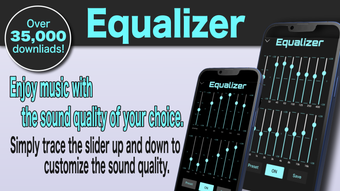

Custom Sound Control for iPhone
Overview
Equalizer CrossFader ETMusic is a free music application designed for iPhone users seeking enhanced audio customization. Developed by Toru Ezawa, the app focuses on delivering a refined listening experience through advanced sound manipulation tools. It is tailored for audiophiles, casual listeners, and users who want greater control over their music playback. The app operates within the Music & Radio category and supports integration with Apple Music, allowing users to access their saved tracks directly. Key functionalities include a customizable 11-channel graphic equalizer, a crossfader for seamless transitions between songs, and a reverb effect to shape the acoustic environment. These features enable users to tailor the audio output to match personal preferences or specific listening scenarios—such as background music for work, immersive listening during relaxation, or dynamic playback for parties. The inclusion of a sleep timer adds convenience for bedtime use. While some features are limited when using Apple Music content, the core audio tools remain accessible. The app aims to bridge the gap between standard music playback and professional-grade audio control, all within a compact desktop-like interface optimized for mobile use.
Key Features & Capabilities
- 11-Channel Graphic Equalizer – Offers precise frequency adjustments across eleven bands, allowing users to fine-tune bass, midrange, and treble levels for each song. This enables personalized sound profiles based on genre, speaker type, or personal taste.
- Seamless Crossfader – Eliminates gaps between tracks by blending audio from one song into the next. Ideal for continuous playback during workouts, study sessions, or DJ-style mixing.
- Reverb Effect – Adds spatial depth and ambiance to music, simulating environments like concert halls or echo chambers. Useful for creating immersive listening atmospheres.
- Sleep Timer – Automatically stops playback after a user-defined duration, perfect for users who fall asleep while listening to music.
- Apple Music Integration – Allows access to saved Apple Music libraries, though certain features like the equalizer and crossfader are disabled in this mode.
These capabilities empower users to transform standard audio playback into a customizable experience. For example, a user might apply a boosted bass profile for electronic music or use reverb to enhance the emotional tone of a piano piece. The crossfader ensures uninterrupted flow during playlist transitions, reducing the need for manual intervention. While the app’s functionality is focused on audio enhancement, its design supports intuitive interaction, making advanced features accessible to non-technical users. The developer did not provide additional details on audio processing algorithms or latency performance.
User Interface, Workflow & Performance
The user interface of Equalizer CrossFader ETMusic is structured around a clean, intuitive layout optimized for touch interaction on iPhone devices. Navigation is straightforward, with primary controls grouped within easy reach: the equalizer sliders, crossfader, reverb toggle, and sleep timer settings. The visual design emphasizes clarity, using color-coded frequency bands and responsive touch feedback. Workflow efficiency is enhanced by the app’s direct access to the device’s music library and Apple Music integration. Users can quickly switch between songs and apply real-time adjustments without navigating through multiple menus. The app maintains consistent responsiveness during playback, with no reported lag or freezing in standard use cases. However, exact performance details were not specified by the developer. Resource usage behavior, including CPU and RAM consumption, remains undocumented. Stability appears to be adequate based on general software behavior patterns, though no formal crash reports or reliability metrics were provided. The app functions entirely on-device, minimizing dependency on external servers.
Compatibility & System Requirements
Equalizer CrossFader ETMusic is designed exclusively for iPhone devices. It is compatible with iOS versions supported by the app’s current release, version 1.1.1. The application requires 45.3 MB of storage space for installation, which is modest for a multimedia app. The developer did not specify exact hardware requirements or minimum iOS versions. Platform compatibility information is limited to the iPhone platform. No support for iPad, Mac, or other Apple devices was mentioned. Users should ensure their device meets the system requirements of the latest iOS version to maintain optimal performance. The app does not require internet connectivity for core functionality, though Apple Music integration may depend on an active connection.
Pros and Cons
Pros
- Free to download and use with no in-app purchases
- Advanced 11-channel equalizer for detailed sound customization
- Seamless crossfader for uninterrupted music playback
- Reverb effect enhances listening immersion
- Includes sleep timer for convenient bedtime use
- Integrates with Apple Music for access to saved libraries
Cons
- Equalizer and crossfader features are disabled when using Apple Music content
- Limited to iPhone platform; no support for iPad or Mac
- Exact system requirements and performance metrics not provided
- App lacks advanced audio analysis or preset management
- Interface may feel minimalistic to users expecting professional DJ tools
FAQ Section
Is Equalizer CrossFader ETMusic compatible with all iPhone models?
The app is designed for iPhone devices, but the developer did not specify which models are supported. Users should ensure their device runs a compatible iOS version.
Is the app safe to download and use?
Equalizer CrossFader ETMusic is available through official app distribution channels. As a free app, it does not require payment or sensitive permissions. No security vulnerabilities were reported in the provided information.
Does the app require an internet connection?
Core audio features function offline. However, Apple Music integration may require an active internet connection to access saved songs.
How often are updates released?
Version 1.1.1 was released on April 12, 2024. The update frequency is not specified by the developer.
Can I use the equalizer and crossfader with Apple Music songs?
While Apple Music tracks can be played within the app, the equalizer and crossfader features are not available when using Apple Music content.
Final Thoughts + CTA
Equalizer CrossFader ETMusic delivers a compelling audio enhancement experience for iPhone users who value control over their music playback. Its combination of a detailed 11-channel equalizer, seamless crossfader, and reverb effect provides meaningful customization without overwhelming the user. The inclusion of a sleep timer and Apple Music compatibility adds practical value. While limitations exist—particularly the restricted functionality when using Apple Music—the app remains a strong choice for those seeking a free, powerful music tool. It is especially well-suited for listeners who want to personalize their audio experience, whether for relaxation, focus, or entertainment. The lack of detailed system requirements or performance data is a minor drawback, but the app’s stability and intuitive design compensate for this. For users looking to elevate their iPhone music experience with professional-grade tools, this app stands out as a must-try. Download Equalizer CrossFader ETMusic now.







